

An ecommerce SEO audit is a structured review of why your online store is not earning the organic traffic and sales it should, across indexing, on-page, site structure, speed, links, and now AI search. The useful version is not a long report from a free tool. It is a short list of the things actually costing you revenue, in priority order. Most audits get this backwards, drowning the few problems that matter in cosmetic ones. This guide walks the audit the way we run it, so you can do the same on your own store and tell the difference between a problem and a distraction.
What an ecommerce SEO audit actually checks
An audit covers six areas, namely indexing, the on-page quality of your product and category pages, site structure, mobile performance, your backlink profile, and whether AI search can quote you.
That list is the easy part. The hard part is judgment. A free tool will hand you a couple of hundred flagged issues, most of which do not cost you a single sale. A real audit finds the few that do and fixes them in order of what they cost you. On most stores the priority stack looks like this.
| Priority | What to fix | Why it costs sales |
|---|---|---|
| Critical | Products and categories missing from the index | A page Google has not indexed earns nothing |
| High | Faceted URLs eating crawl budget | New products get discovered and crawled slowly |
| Medium | Thin or duplicate product and category copy | Pages rank below stores that say more |
| Low | Minor metadata inconsistencies | Real but small, rarely the bottleneck |
We run the audit top to bottom because each step depends on the one above it.
Step 1: Find the pages Google quietly dropped
Start with indexing, because a page that is not in the index cannot rank for anything. On a large catalog this is where the biggest losses hide, and almost nobody looks first.
Open the Pages report in Google Search Console and read the "Not indexed" reasons. On a store with a few thousand products, it is normal to find a meaningful share sitting in "Crawled, currently not indexed" or "Discovered, currently not indexed." Those are products Google has seen and decided to skip. Check what they have in common. Often they are out-of-stock items, near-duplicate variants, or thin pages with manufacturer copy and nothing else.
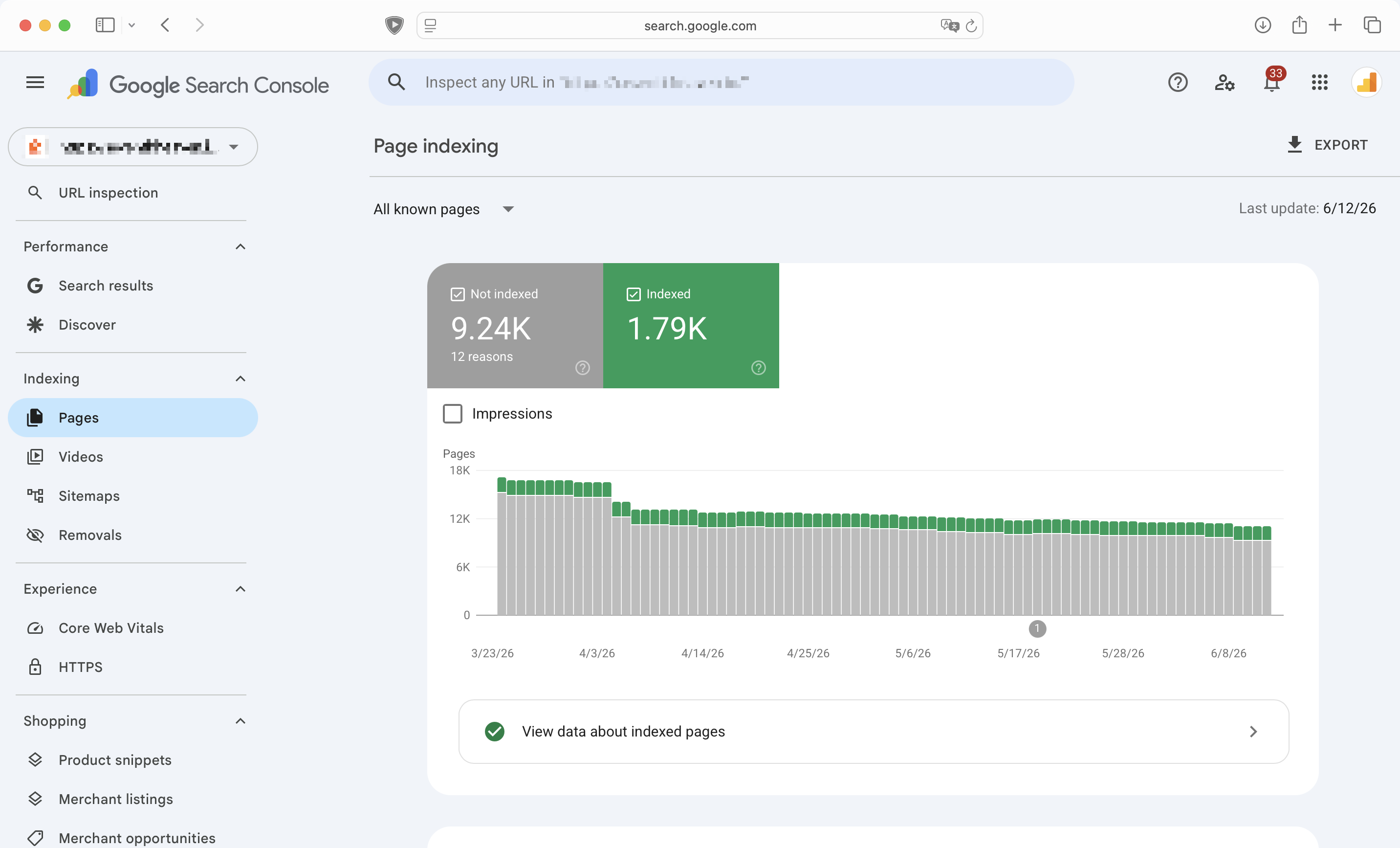
We ran exactly this check on an Indian ecommerce store. Its Page indexing report showed more than 9,000 URLs in the not-indexed bucket against about 1,790 indexed, so most of the catalog was invisible to search before any ranking question came up.
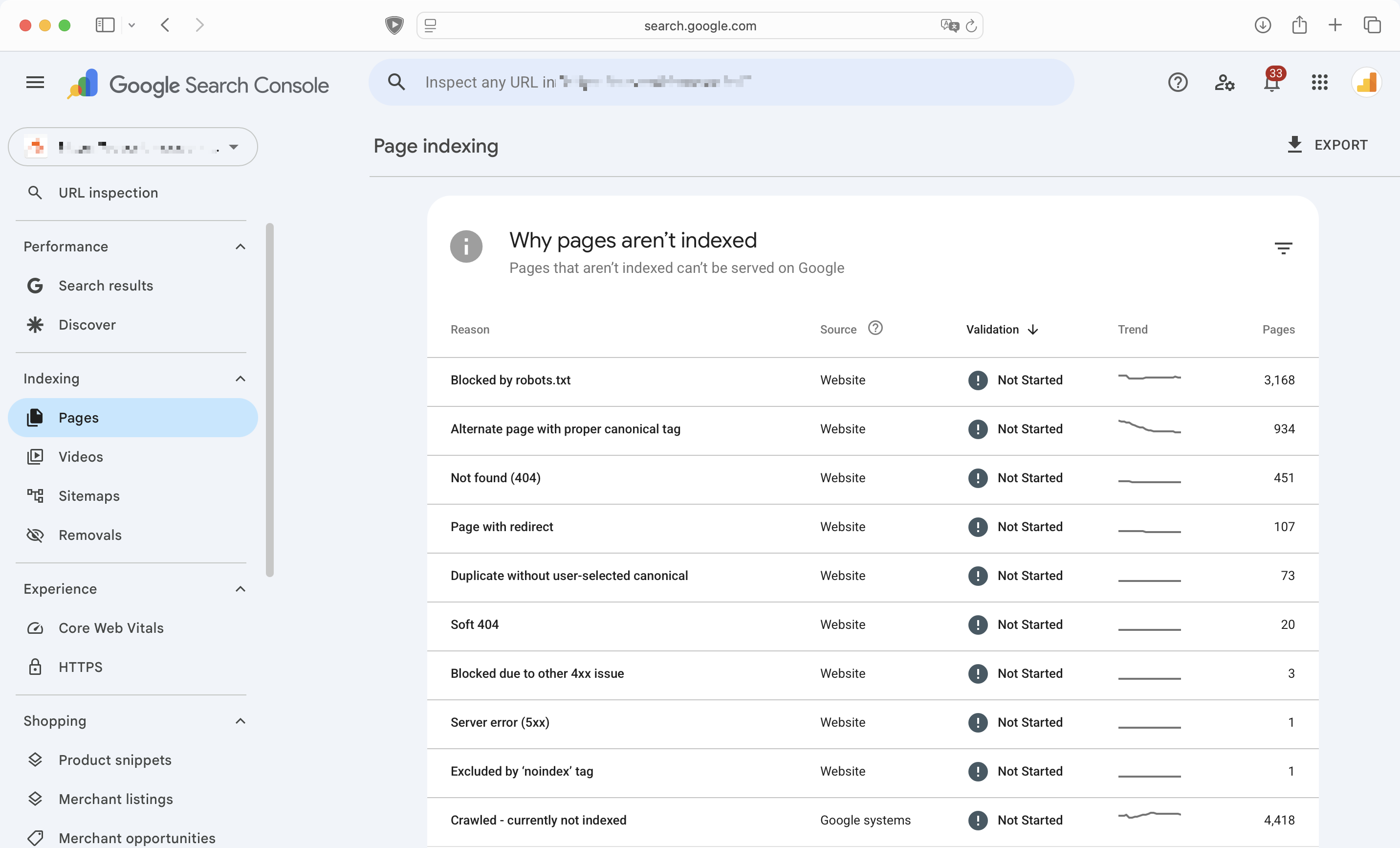
The not-indexed pages clustered into a handful of reasons, and that is the pattern to look for. Here the two biggest buckets were 4,418 pages crawled but not indexed and 3,168 blocked by robots.txt, with another 451 returning a 404. Fix the reason and you fix pages by the thousand, not one at a time.
Then look at how you handle products that come and go. Discontinued items, seasonal stock, sizes that sell out. A store that returns a soft 404 or a bare "out of stock" page for hundreds of URLs is teaching Google to crawl less of the site. Decide a rule for each case, then apply it across the catalog rather than product by product.
Step 2: The product and category page audit
The index tells you which product and category pages Google keeps. Whether those pages earn a ranking is a separate question, and it comes down to what is on them. Most ecommerce sites are built from templates, which is sensible. The problem is when the template is the only thing on the page. Product and category pages are what people actually search for, so this is where an ecommerce website SEO audit earns its keep.
On product pages, check three things. Are the title tags and meta descriptions generated from a pattern that reads naturally, or do they all collapse into the same shape. Is the product description real writing, or the manufacturer's text pasted on every retailer's site. Is there anything on the page a shopper could not get from ten other stores. On category pages, the common gap is content. A category page can rank for high-value buying terms, yet it often carries the least on it, often just a heading, a grid of products, and nothing that explains the range or answers a buyer's question.
You do not need a paragraph of filler under every grid. You need the few categories that drive revenue to read like someone who knows the products wrote them.
Step 3: Site structure, internal links, and faceted navigation
Once the pages are worth ranking, check that Google can reach them. Audit how a shopper, and a crawler, get from the home page to a product. A clean structure runs home to category to subcategory to product, with internal links that pass importance toward the pages you want to rank. If a key product takes five clicks to reach, it is telling Google it does not matter.
Internal links are the lever most stores underuse. Link from your high-authority pages, often the home page and top categories, toward the products and guides you care about, with anchor text that describes the destination.
Then there is faceted navigation, the filters for size, color, and price. Left open, they can generate millions of crawlable URLs from a few hundred products, every filter combination its own address. This is the most common technical trap in ecommerce. Audit which filter URLs are crawlable and indexable, and confirm the store is not spending its crawl budget on filter noise instead of products.
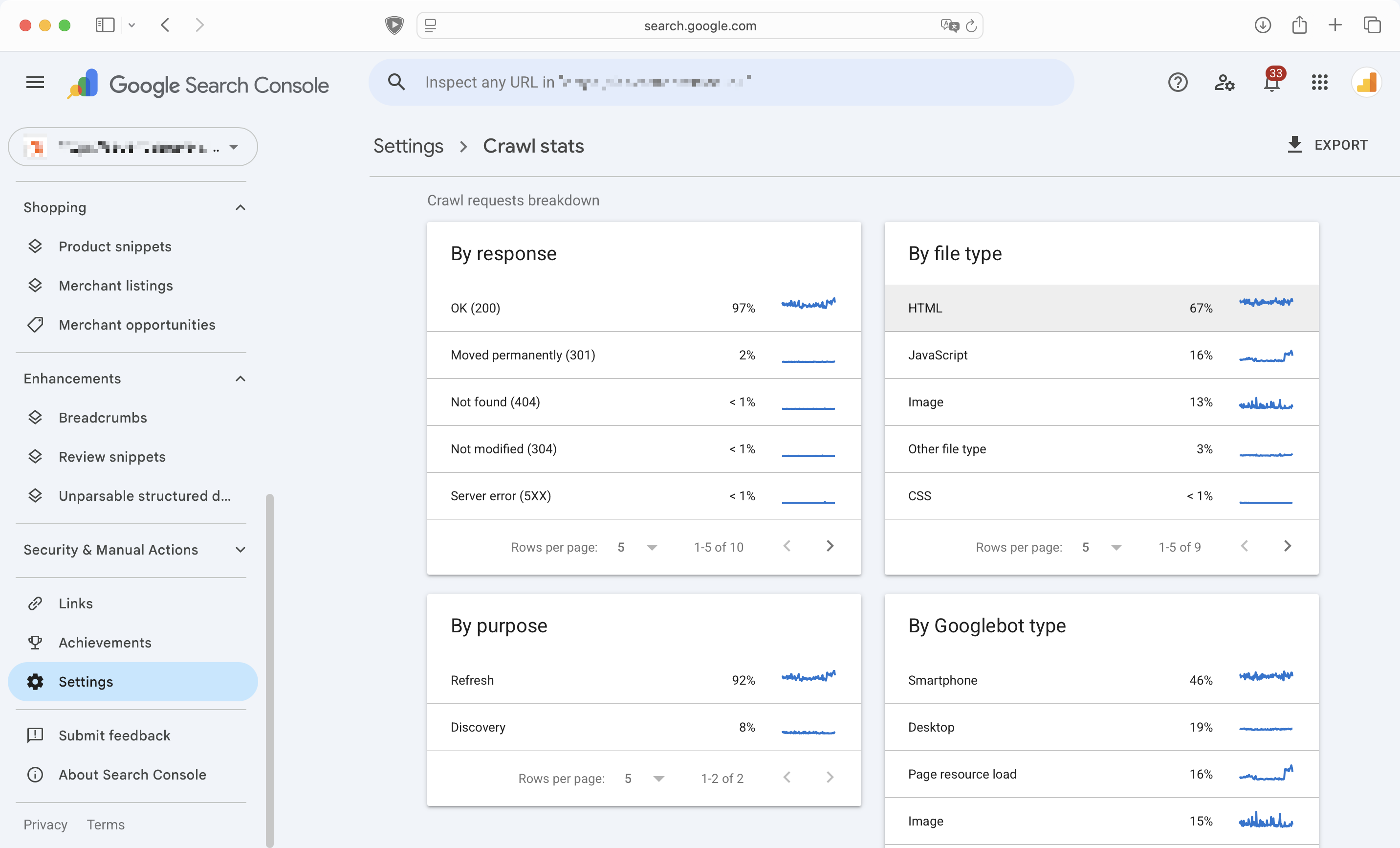
On the store, 92% of Google's crawling went to re-fetching pages it already knew and only 8% to discovering new ones. A split that lopsided is worth a hard look when a growing catalog needs its new products found and crawled.
Step 4: Speed and mobile, measured the right way
Speed is where most store owners over-audit and mismeasure. Check Core Web Vitals in the actual report, not a single lab score. The metric that matters here is Interaction to Next Paint, which replaced First Input Delay as a Core Web Vital in March 2024. If you are still auditing against FID, you are measuring something Google retired. INP looks at how quickly the page responds when a shopper taps a filter, opens a menu, or adds to cart, which is exactly the kind of interaction a store lives on.
Most ecommerce speed problems trace to two sources, heavy product imagery and third-party scripts. Review which marketing tags, chat widgets, and app embeds load on every page, and what each one costs. Audit on mobile first. For a large share of Indian shoppers the store is a mobile experience on a mid-range phone and a patchy connection, and that is the version Google measures.
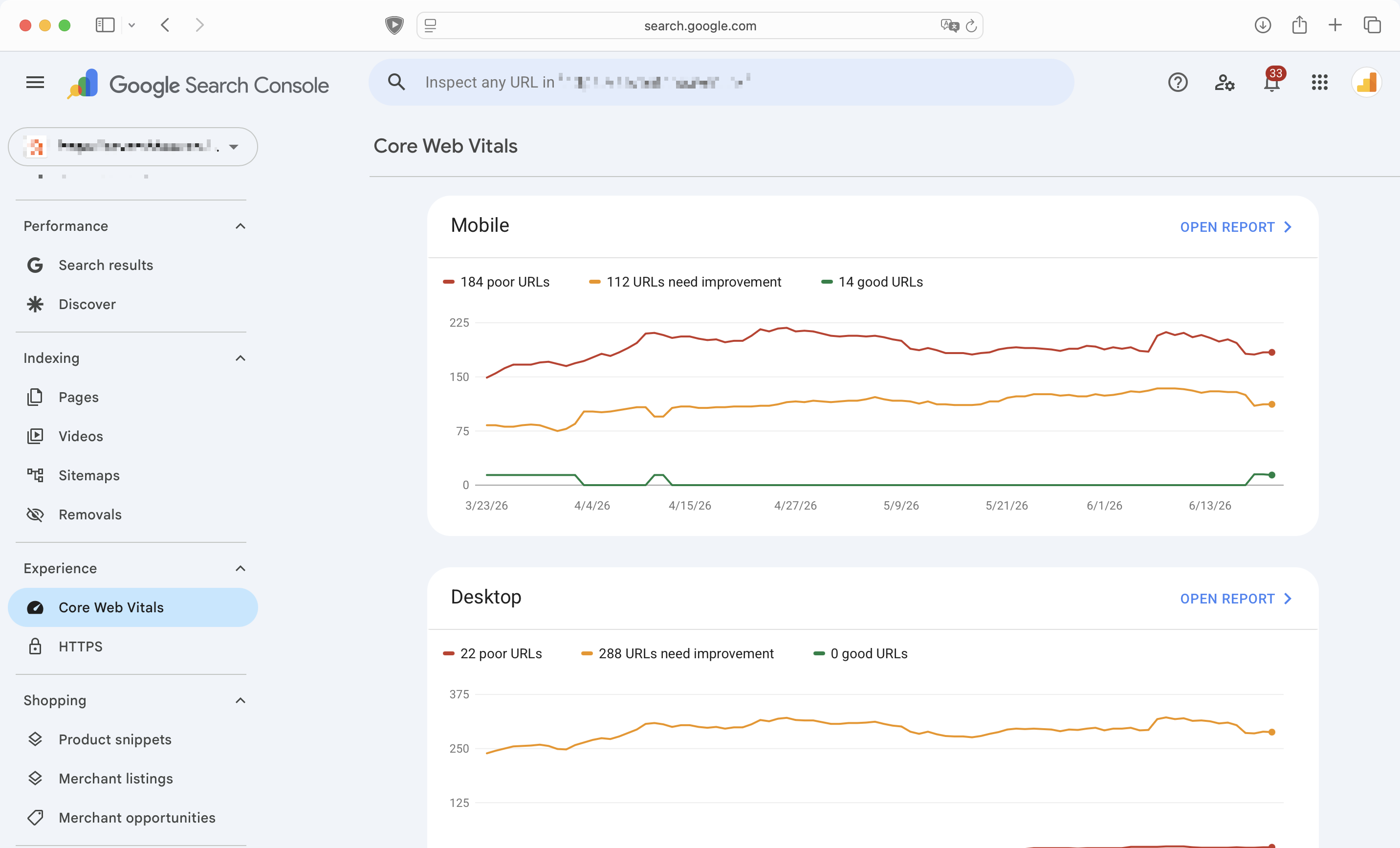
On the store, 14 mobile URLs passed Core Web Vitals and 184 were rated poor. That is a common starting point for a store that grew by adding apps, scripts, and heavier imagery over time.
Step 5: Backlinks, an honest short pass
Off-page deserves a place in the audit and a strict time limit. Look at your backlink profile, but keep it in proportion. Links still matter to rankings, and they are rarely where a store is actually leaking traffic.
Check three things and move on. Are there toxic or irrelevant links from a past agency or a directory binge. Have you lost links that used to point at important pages, worth a reclaim. And where are competitors getting links you could plausibly earn, through suppliers, press, or genuinely useful content. Skip the part of the tool that scores every link and demands you disavow on a schedule. That work rarely changes what a store ranks for.
Step 6: Can AI search quote your store?
A store is quotable by AI search when its product and category pages state their facts in plain sentences, carry valid structured data, show real reviews, and use headings that map to the questions buyers ask. That is what an AI Overview or a tool like Perplexity lifts into an answer. This is the step most audits skip, and the one with the clearest upside in 2026.
Google's own position is that optimizing for AI answers is still SEO, not a separate channel, so this audit is an extension of the work above, not a new discipline. Audit whether your structured data is valid and whether the page states its facts in sentences, rather than burying them in images and tabs a model cannot read. The stores that get quoted are the ones that answer the question on the page.
The most useful audit we run is the one that ends with three things to fix, not three hundred. A finding nobody owns is just a slower way of changing nothing.
The ecommerce SEO audit checklist
If you want the short version, run these in order. The first three usually hold the findings that move revenue:
- Check indexing first. In Search Console, find products stuck in "Crawled" or "Discovered, currently not indexed," and fix the pattern behind them.
- Audit product and category pages. Kill duplicate manufacturer copy and templated meta on the pages that earn money.
- Check structure and faceted nav. Confirm filters are not generating millions of crawlable URLs, and point internal links at priority products.
- Measure Core Web Vitals. Audit INP and mobile on real data, starting with images and third-party scripts.
- Do a short backlink pass. Clear toxic links, reclaim lost ones, and ignore the vanity scores.
- Audit for AI search. Make product facts extractable, with valid structured data and direct on-page answers.
On Shopify, two store-specific items belong on every audit. Collection and product URLs can duplicate the same item across several paths, and app bloat quietly adds scripts to every page until speed suffers. Both are common, and both are quick to confirm once you know to look for them.
FAQ
What should an ecommerce SEO audit include? Six areas, in order of impact. Indexing, the on-page quality of product and category pages, site structure and internal links, Core Web Vitals on mobile, backlinks, and whether AI search can extract your product facts. Each one is checked against what it costs you in sales, not against a generic score.
How much does an ecommerce SEO audit cost? It depends on the size of the catalog, the platform, and how deep the review goes. A surface scan from a free tool costs nothing and is worth roughly that. A genuine audit that ends in a prioritized fix list is scoped to the store. Judge a quote by whether it produces decisions you can act on rather than a PDF of warnings.
How long until an audit shows results? Technical fixes like indexing and structure can show movement within a few weeks as Google recrawls. Content and authority gains take longer, often months, because rankings respond to sustained quality, not a one-time pass. Be wary of anyone who promises a fixed ranking on a fixed date, because recrawling and re-evaluation take the time they take.
Where an audit actually pays off
An audit is only worth running if it ends in a prioritized fix list someone owns. A report full of warnings that no one acts on will not move a single ranking. Work the steps in order, fix the few things that cost you sales, and leave the rest alone.
The audit above is live work. We are fixing the indexing and crawl problems now, and we will update this post with the before-and-after numbers once the next Search Console report comes in.
If you would rather have the audit and the fix list done for you, with the priorities already sorted, that is the ecommerce SEO work we do at DO Communication, out of Gurgaon and Bangalore.